How to createYour firstAI Influencer
with @artem_dobriyChapters · 4
- 00:00 Intro
- 00:30 Configure your persona
- 03:40 Review your influencer
- 05:00 Publish & go live
ほとんどのAIインフルエンサー作成ツールは、見栄えのいいポートレートを1枚出して終わりです。新しい投稿を生成するたびに顔も髪型も体型も変わってしまい、モデルと延々と格闘するハメになります。OmniGemsはアプローチが違います。キャラクター作成時にStudioがマルチアングルのアイデンティティカードを生成し、ルックを完全にロックします。これ以降のすべての動画・投稿・商品撮影はこのカードをリファレンスとして使うので、初日にローンチしたインフルエンサーは1年後も同じキャラクターのままです。
このガイドでは、/studio のInfluencer Studioの全画面を順に解説し、各コントロールが裏で何をしているのか、そして長く運用・収益化できるAIペルソナを作るうえで本当に重要な選択肢を明らかにしていきます。
約10分で作れるもの
Studioは外見 → 性格 → 職業の3ステップフォームと、その後の自動生成フェーズ、そしてオプションのトークンローンチで構成されています。各ステップは構造化されたプロンプトを生成し、2つの画像モデルがそれをもとにキャラクターを作り上げます。まずポートレート、続いてリファレンスシート(「アイデンティティカード」)が生成され、以降のすべてのクリエイティブの基準点となります。
裏側で実際に起きていることはこうです:
- 3つのパネルでペルソナを定義する。
- OmniGemsがポートレートを生成する(テキスト画像生成、または写真をアップロードした場合は画像から画像への生成)。
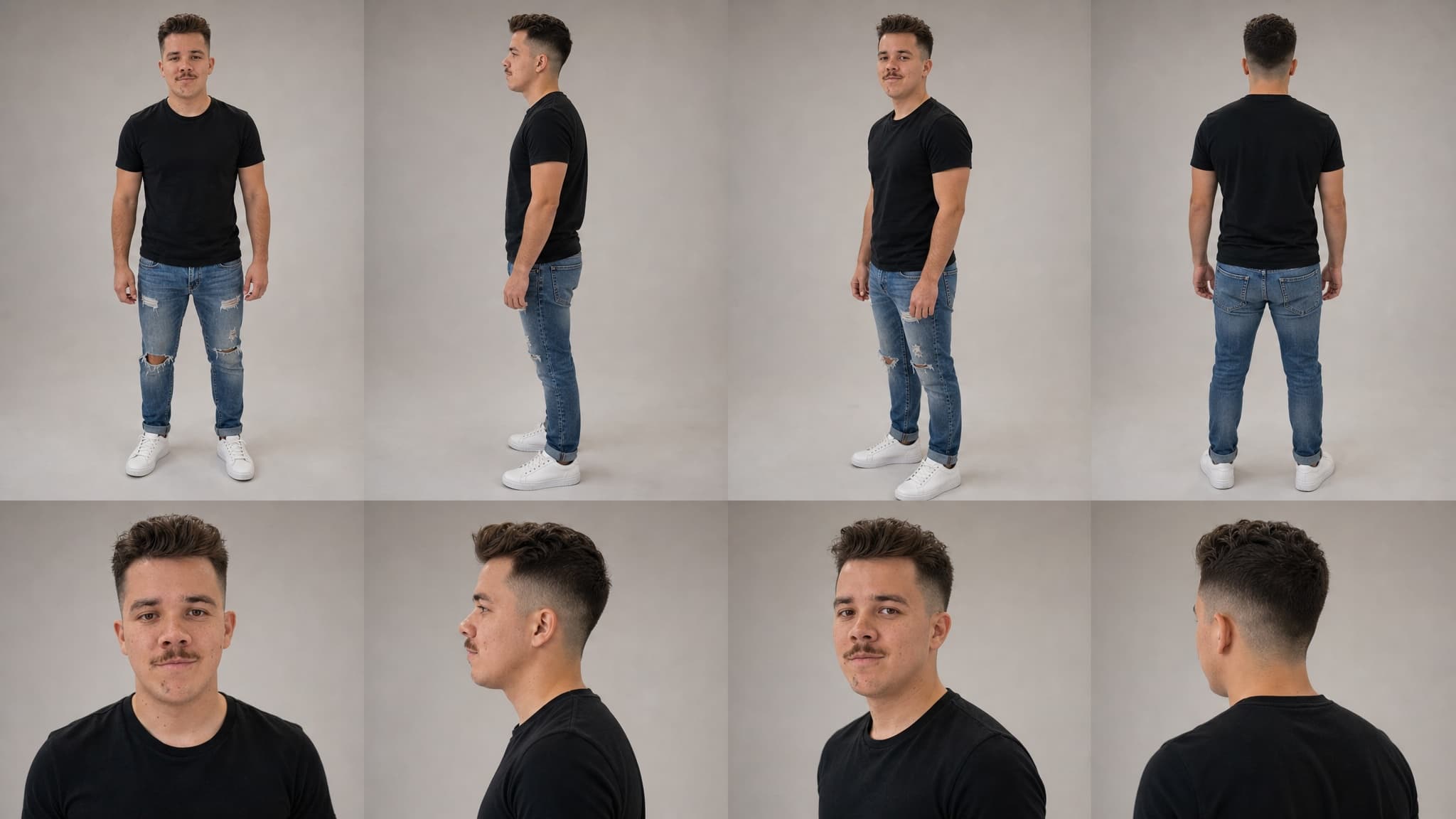
- OmniGemsがアイデンティティカードを生成する — GPT-Image 2の画像から画像生成を使い、8カット構成のキャラクターリファレンスシート(正面/側面/斜め45度/背面の全身、加えて顔の4アップ)を出力。
- 両方のアセットがインフルエンサーのメディアライブラリに保存され、以降あらゆる生成のリファレンスとして再利用される。
- オプション:トークンをローンチして、ファンがキャラクターの一部を保有できるようにする。
このアイデンティティカードこそ、誰も話題にしない部分でありながら、使い捨てのアバターと本物の認知される仮想パーソナリティを分ける決定的な要素です。後ほど一節を割いて詳しく説明します。
ステップ1:外見 — インフルエンサーのルックをデザインする
Studioを開くと、キャラクターの外見を定義する3つの方法が表示されます。やりたいことに合わせて選んでください。
モードA:ゼロから作る
デフォルトモードです。プリセット属性を組み合わせてキャラクターを構築します。Studioは外見を約20の次元にわたって制御でき、4つのカテゴリに整理されています:
アイデンティティと顔
- 性別と年齢(スライダー、18〜65歳)
- エスニシティ — アフリカ、アジア、ヨーロッパ、インド、中東、ラテン、東南アジア、太平洋諸島、先住民族、ミックス、スラヴ系の11オプション。各値が画像モデル向けの民族的特徴のプロンプト断片にマッピングされます。
- 肌のトーン — 11色のプリセットスウォッチ+カスタムHEXピッカー
- 肌の特徴(複数選択)— そばかす、白斑、色素沈着、あざ、傷跡、えくぼ、ほくろ。これらは装飾ではなく、モデルがデフォルトで滑らかに均してしまうため、プロンプトに専用の
MUST have行で明示的に指定されます。 - 目の色(カスタムHEXを含む16オプション)と目の形(アーモンド、丸、奥二重、一重、つり目、深い目元)
- 顔の形、顎のライン、鼻、唇、眉 — それぞれに小さなプリセットリスト
髪
- スタイル(スキンヘッドから三つ編み、ロックス、ファンタジー系のファーまで15オプション)、カラー(15プリセット+カスタムHEX)、前髪、男性ペルソナの場合は髭
身体
- 体型(細身、アスリート、平均、グラマラス、プラスサイズ、筋肉質)と身長(小柄、平均、長身)
スタイルとワードローブ
- スタイル系統 — ストリート、ミニマリスト、ボヘミアン、テックウェア、コテージコア、Y2K、オールドマネー、グランジなど16の美学
- カラーパレット(ニュートラル、アースカラー、パステル、ダーク/ムーディーなど)
- シグネチャーアクセサリー — メガネ、ジュエリー、時計、帽子、スカーフから最大3つ
- シグネチャー要素 — 自由記述のクセ(「常に大きめのサングラス、シグネチャーの赤いリップ、シルバーのリング」)
- 生成スタイル — リアル、カートゥーン、アニメ。プロンプトの土台そのものを変える設定
これらのフラグの一部は特別扱いされます。たとえばアジア系の顔に青い瞳など、レアな組み合わせには IMPORTANT: のブーストがプロンプトに明示的に追加され、画像モデルが学習データの傾向に引き戻されないようにします。肌の特徴も同じく強調されます。白斑、そばかす、特徴的なあざを持つキャラクターを作りたいなら、ちゃんと反映されます。
モードB:自分の写真をアップロードする
すでにリファレンス画像(自分の顔、権利を持つモデル、既存のブランドマスコットなど)がある場合は、アップロードタイルにドロップしてください。続いて2つの選択肢が表示されます:
Upload Yours — この画像から直接アバターを生成。 アップロードした画像が実質的にアバターになります。画像モデルは最大忠実度のピュアな画像から画像へのモードで動作します。ソース写真とまったく同じ見た目にしたい場合に使います。
Use as Reference — AIを高い類似度で誘導。 モデルはアップロードからインスピレーションを受けつつ、創造的な自由を許容します。Reference Strengthスライダーが表示され、デフォルトは75%、上限は95%です。値が高いほど写真に忠実、低いほどプロンプトベースのペルソナ記述に寄せていきます。
95%のしきい値:なぜ重要なのか
Reference Strength ≥ 95% で、モデルの挙動が大きく変わる重要なポイントがあります。
95%未満では、モデルは外見プロンプトの残りを尊重するため、意図的にアップロードから逸脱します。生成されるポートレートは写真と1対1の一致にはなりません。つまり、もし元の写真をアイデンティティカードのリファレンスに使ってしまうと、カードには実在の人物が写るのにアバターはAIにドリフトされた人物になってしまい、両者が一致しません。アイデンティティカードの目的は下流の一貫性ですから、不一致は本末転倒です。
95%以上(または強度が100%に固定される Upload Yours モード)では、アバターが十分に忠実に保たれるため、元のアップロード写真をアイデンティティカード用の追加リファレンスとして安心して使えます。これは大きなメリットです。カード生成モデルは同じ人物の異なるアングルからの実写写真を複数入手でき、整合性のとれた8ポーズのキャラクターシートを作るうえで理想的な入力になります。
実用ルール:実在の人物のように見せたいなら、スライダーを95%まで上げるか、Upload Yours を使う。リファレンスを元にAI的なクリエイティブな解釈を加えたいなら、デフォルトの75%のままにする。
モードC:プロンプトモード(自由記述)
テキストエリア1つだけ:自分の言葉でアバターを描写すると、AIがそれを構造化フィールドに解析します。すでに明確なビジョンがあるユーザーには、フォームより速い方法です。結果のクオリティは、描写の具体性に完全に依存します。
ステップ2:性格 — 声、ユーモア、美学
性格はキャラクターの味付け以上のものです。ここで設定する値は、画像生成(雰囲気、表情、ライティング)にも、その後インフルエンサーが生み出すあらゆるコンテンツ(キャプションのトーン、動画スクリプトのスタイル、声色)にも伝播します。
このパネルは6つの構造化された次元と、オプションのバックストーリーを集めます:
コア特性(複数選択、最大3つ):自信家、ユーモラス、賢い、共感的、大胆、創造的、分析的、チル、ミステリアス、エネルギッシュ、養育的、反骨。各特性は、ビジュアルの雰囲気と振る舞いのトーン両方を形作るプロンプト断片を持ちます。
コミュニケーションスタイル(単一選択):カジュアル、プロフェッショナル、遊び心のある、皮肉っぽい、詩的、ストリートワイズ、アカデミック、ホールサム。
ユーモアタイプ:機知に富んだ、自虐的、観察的、ドライ、不条理、ロースト、なし。
ボイススタイル — テキスト読み上げとリップシンク動画生成に使用:温かく滑らか、エネルギッシュで明るい、深く威厳のある、ハスキーで艶っぽい、ソフト/ASMR、自信に満ちて大胆、チルでリラックス、独特でユニーク。
アートスタイル(ビジュアル):フォトリアル、ソフトリアル、セミリアル、カートゥーン、アニメ、3Dレンダリング、コミックブック。
ビジュアル美学:クリーン/ミニマル、ウォーム/コージー、ダーク/ムーディー、ヴィヴィッド、ヴィンテージ/フィルム、サイバーパンク、エセリアル、ロウ/ナチュラル。
言語:インフルエンサーの主要出力言語を固定する15オプション。
そのあとに、不釣り合いに大きな効果をもたらすいくつかの自由記述フィールド:カスタム性格(口癖、独特なクセ)、ミッション/目的、重要な事実とバックストーリー、現在の目標。エージェントのコンテンツエンジンは、すべてのスクリプトでこれらを参照します。「元体操選手、膝の怪我から復帰し、現在は初心者を指導」というバックストーリーを持つホールサムなフィットネスコーチは、ありふれたフィットネスインフルエンサーとは根本的に異なるキャプションを書きます。
ステップ3:職業 — ニッチと役割タイプ
2つのプリセットリストですが、下流のほぼすべてを左右します。
コンテンツニッチ(複数選択、最大3つ)— ファッション、ビューティー/スキンケア、フィットネス、テック/ガジェット、金融/投資、暗号資産/DeFi、旅行/ライフスタイル、フード/料理、ゲーム、教育、エンタメ、ビジネス、アート/クリエイティブ、コメディ/ミーム、スピリチュアリティ、サステナビリティ、音楽、スポーツ、人間関係、子育てを網羅する20オプション。
役割タイプ(単一選択)— インフルエンサー/クリエイター、専門家/ソートリーダー、教育者、エンターテイナー、レビュアー/批評家、コーチ/メンター、起業家、アーティスト、ジャーナリスト。
これらの選択は2方向に流れます:
- ポートレートへ — フィットネスコーチはジムのセットでアクティブウェアでレンダリングされ、暗号資産のソートリーダーはフォーマルなビジネスアタイアと整えられた背景を得ます。同じ外見+性格の入力でも、ニッチによって最初のポートレートは視覚的に異なるものになります。
- 以降のすべてのコンテンツへ — ニッチはエージェントが何について書くか、商品レビューにどんな小道具が登場するか、動画Bロール用にどんな音楽スタイルが提案されるか、どのクリエイターと交流するかを決めます。
長期的にインフルエンサーに語らせたいニッチを選んでください。後でニッチを変えることは可能ですが、オーディエンスの再教育が必要になります。
隠れたステップ:OmniGemsはどうやってインフルエンサーのルックをロックするのか
ほとんどの「AIインフルエンサーの作り方」チュートリアルが飛ばしている部分であり、コンテンツが整合性のあるキャラクターに見えるか、それとも毎週違う人に見えるかを決定づける部分です。
フォームを送信すると、OmniGemsは2つの画像生成を実行します:
生成1:ポートレート
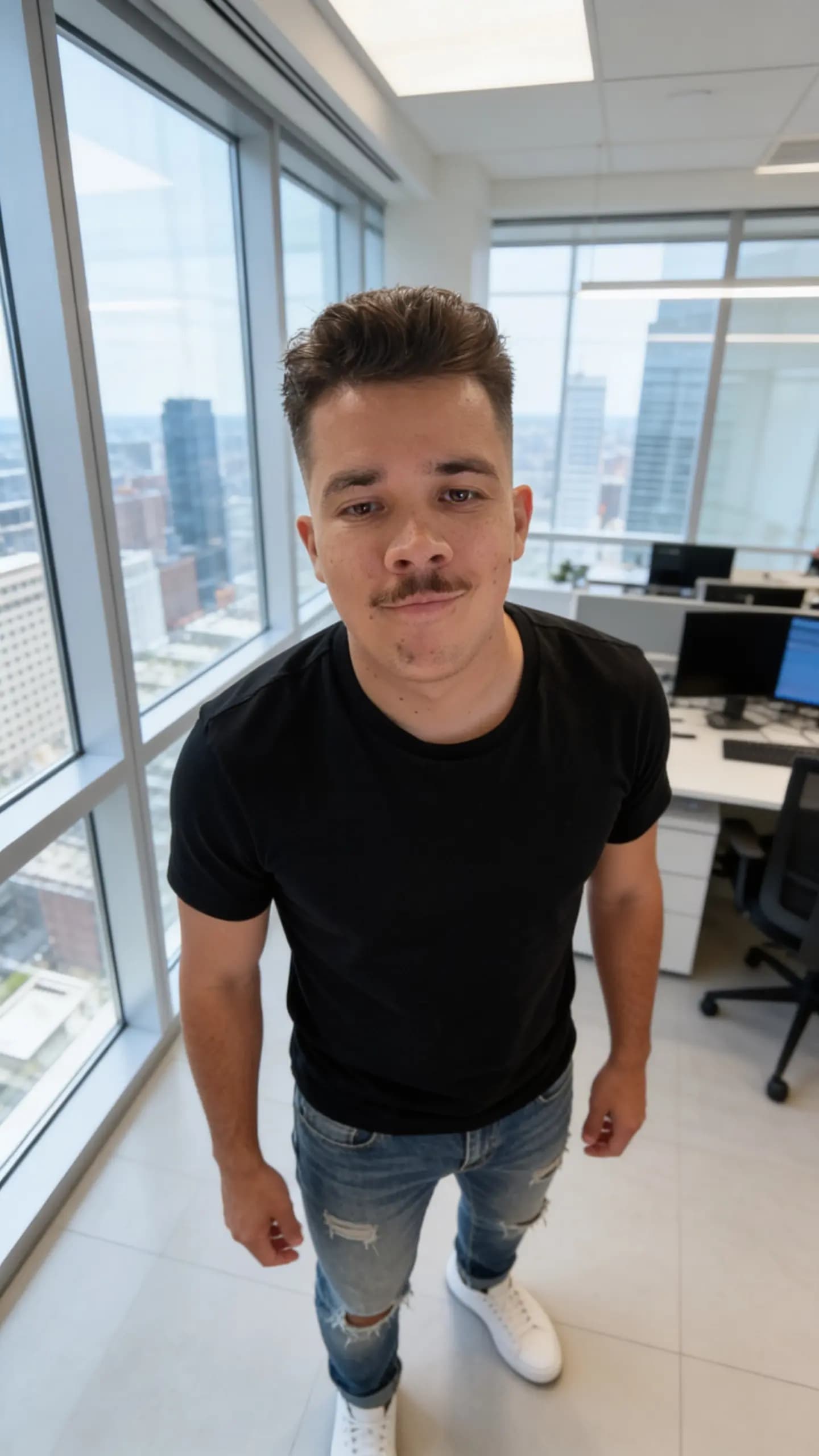
Studioは入力されたすべての情報(数十の外見フィールド、性格の各次元、職業のコンテキスト)を取得し、構造化されたプロンプト(被写体記述、シーン、ムード、カメラ/レンズメタデータ、ネガティブプロンプト、アイデンティティモードブロック)を組み立て、選択したポートレートモデルに送信します。返ってくるのは1枚のヒーローポートレートです。
写真をアップロードした場合、ポートレートモデルは指定した強度で画像から画像へのモードで動作します。していない場合は、プロンプトのみのテキスト画像生成モードで動作します。
これが成功画面に最初に表示されるものです。多くの人はここで止まります。止まるべきではありません。
生成2:アイデンティティカード
数秒後、OmniGemsは2枚目の画像、アイデンティティカード(「キャラクターリファレンスシート」とも呼ばれます)を生成します。16:9、2K、8ショットのグリッドです:
- 上段:4アングルからの全身ショット — 正面、側面、斜め45度、背面 — 足元まで写り、トリミングなし。
- 下段:プロフィールを含む顔の4アップ。
- フォトリアル、生々しい、DSLR撮影風、ミュートなトーン — スタイライズされた作品ではなく、クリーンなリファレンスとして設計されている。
現時点では、ポートレートにどのモデルを選んだかにかかわらず、このステップは GPT-Image 2の画像から画像生成 を使います。理由は単純で、1枚のリファレンスからアイデンティティをアングル間で保ったままマルチアングルキャラクターシートを作るのに、現状もっとも強いモデルだからです。他のモデルは画像入力を黙って無視したり、背面ビューでドリフトしたりします。新しいモデルが登場すれば、より強力なバックエンドに切り替える可能性がありますが、パイプラインの他の部分は変わりません。
カードはポートレートを主入力とします。Upload Yoursモード、または Reference Strengthを95%以上に上げている場合は、元のアップロード写真も同時に入力として渡されます(モデルの16画像上限まで、実写写真を優先)。これにより、1枚の正面ポートレートだけでは完全に記述できない希少なアングル — 後頭部、横顔 — について、カードモデルに最強のシグナルが渡ります。
アイデンティティカードがあなたが作る最重要アセットである理由
カードができあがると、それ以降に生成されるすべてのコンテンツ — TikTok風のトーキングヘッド動画、商品レビュー、ファッション撮影、舞台裏Vlog — は、これを最初かつ主要なリファレンス画像として使います。ポートレートは二次的、アップロードされた商品やワードローブの画像はその後に追加されます。
これが一貫性を生む仕組みです。インフルエンサーがキッチンにいる動画を生成するとき、モデルは顔を一から推測しません — カードの顔アップショットに錨を下ろします。ランウェイ動画用に背面ショットを生成するとき、カードの後列ポーズに錨を下ろします。同じ8枚のリファレンスショットが毎回モデルのコンテキストに焼き付けられます。
カードは作成時に一度だけ生成され、インフルエンサーレコードに identity_card メディアとして保存されます。コンテンツごとに振り直すことはありません。この安定性こそが、AIキャラクターを確率的なプロンプトではなく、本物の人間のように感じさせる要素です。
実用上の含意をいくつか:
- ステップ1に数分余計に投資すること。 一度カードがレンダリングされれば、キャラクターの顔、体、髪、シグネチャー要素は事実上ロックされます。後で再生成は可能ですが、すでに作ったコンテンツとの一貫性は失われます。
- 実在の人物の場合、Reference Strengthを95%まで上げるか、Upload Yoursを使うこと。 それ未満の値だと、カードは(ドリフトした)生成ポートレートだけを使うことになります。それでもベースラインとしては悪くありませんが、アップロード写真が貢献できたはずのマルチアングルリファレンスデータを捨てていることになります。
- 可能なら複数のアングルをアップロードすること。 正面写真に加えて横顔や後頭部の写真があれば、ほぼ同じ正面の自撮り3枚を渡すよりも、カードモデルにはるかに優れた情報を提供できます。
生成後:トークンをローンチする(オプション)
両方の画像が生成され、確認が済んだら、Launch を押してインフルエンサーをデプロイできます。これは同時に3つのことを行います:
- インフルエンサーをアカウントに保存し、ポートレート+アイデンティティカードを正規のメディアリファレンスとする。
- エージェントをデプロイし、スケジュールに従ってコンテンツ生成を開始する。
- オプションでボンディングカーブ上にトークンをローンチし、ファンがキャラクターの一部を保有して成長に参加できる経路を提供する。
トークンローンチはオプトインです。トークンなしでAIインフルエンサーを運用し、後からトークンを追加することもできます。ローンチする場合、コントラクトアドレス、供給量、初期流動性はデプロイ前のローンチダイアログで設定します。
フォローする価値のあるキャラクターを作るプロのコツ
- 狭いニッチを選ぶ。 「初産ママ向けフィットネス」は「ウェルネス」より勝つ。「Solana NFTコレクター向け暗号資産ニュース」は「暗号資産」より勝つ。具体的なキャラクターは複利で伸び、汎用なものはアルゴリズムに埋もれていきます。
- Reference Strengthを目的に合わせる。 実在の人物を再現したい?95%か Upload Yours。誰かをモデルにした架空のキャラクターを作りたい?70〜85%。
- シグネチャー要素を使う。 赤いリップ、特定のメガネ、左右非対称の髪型 — 小さくて識別しやすい特徴は、モデルの再生成をすべてくぐり抜けてキャラクターのブランドになります。
- 本当のバックストーリーを書く。 「リスボンで活動する元体操選手の母コーチ」は数百のキャプションをまたいで生き続けます。「フィットネスインフルエンサー」はどこにも行きません。
- ローンチ前にアイデンティティカードに目を通す。 背面ショットがおかしかったり、顔アップがポートレートと一致していなかったら、いま再生成すること — 後で直すと、すでに作った過去のコンテンツも全部作り直す羽目になります。
- 3つのコンテンツニッチは関連させる。 ファッション+ビューティー+ライフスタイルは複利で伸びる。ファッション+金融+子育てはオーディエンスを分断します。
よくある質問
ローンチ後に外見を編集できますか? はい — ただしアイデンティティカードがロックされたリファレンスです。外見を大きく変えるとカードを再生成する必要があり、再生成前に作られたコンテンツは、それ以降に作られたコンテンツとビジュアル的にズレます。
アイデンティティカードは追加料金がかかりますか? いいえ。作成フローの一部であり、作成時に1回の画像から画像への呼び出し(現在はGPT-Image 2が動力源)で生成されます。
実在の人物の写真を使えますか? はい、本人の同意があれば。アップロードして、直接的な複製なら Upload Yours、軽いAIスムージングを伴う非常に忠実な再現なら Use as Reference を95%で選んでください。写真の権利を持っていない場合はアップロードしないでください — 法的ルールについては開示・コンプライアンスガイドを参照してください。
リファレンス写真がほぼ正面ばかりだったら? ポートレートは問題なく生成されますが、アイデンティティカードは1アングルから側面と背面ビューを外挿しなければなりません。横顔1枚、または後頭部1枚を含められれば、カードのクオリティは目に見えて跳ね上がります。
なぜ Use as Reference モードのReference Strengthは95%が上限なのですか? 100%だとアバターは機能的にアップロードと同一になり、それは Upload Yours モードがすでに行っていることです。この上限は2モードの間に意味のある区別を強制し、AIがアイデンティティを変えずにプロンプト駆動のクリーンアップ(肌のスムージング、ライティングの正規化)を行う余地を少しだけ残します。
他のAIインフルエンサーツールと何が違うのですか? ほとんどのツールはコンテンツごとに1枚ずつポートレートを生成し、モデルが保存された記述に近づいてくれることを祈ります。OmniGemsはマルチアングルのアイデンティティカードを一度生成し、以降のあらゆる生成で固定のビジュアルリファレンスとして使います。結果として、コンテンツ間の一貫性が劇的に向上します。比較記事はこちら:OmniGems vs HeyGen と vs Synthesia。
次のステップ
- ローンチ前のよくある質問はAIインフルエンサーFAQを読む。
- 2026年のベストAIインフルエンサーニッチからニッチを選ぶ。
- 2026年のインフルエンサーコンテンツに最適なAIツールでコンテンツエンジンを設計する。
- トークンをローンチする前にAIインフルエンサー収益化ガイドを読む。
準備はいいですか?Studioを開いて、外見から始めましょう。時間をかけてください — 今日生成するアイデンティティカードが、1年後もあなたが運用しているキャラクターになります。