How to createYour firstAI Influencer
with @artem_dobriyChapters · 4
- 00:00 Intro
- 00:30 Configure your persona
- 03:40 Review your influencer
- 05:00 Publish & go live
ज़्यादातर AI इन्फ्लुएंसर tools एक खूबसूरत portrait बना देते हैं, और फिर हर नई पोस्ट generate करते समय आपको model से लड़ना पड़ता है — हर बार अलग चेहरा, अलग बाल, अलग body। OmniGems का तरीका अलग है: creation के समय ही, Studio आपके character का एक multi-angle identity card बनाता है जो उनके look को lock कर देता है। हर future वीडियो, पोस्ट और product shot उसी कार्ड को reference के तौर पर इस्तेमाल करता है — यानी जो इन्फ्लुएंसर आप day one पर launch करते हैं, वही character एक साल बाद भी होगा।
यह गाइड /studio पर मौजूद Influencer Studio की हर screen को step-by-step explain करती है, यह बताती है कि हर control असल में background में क्या करता है, और एक long-running, monetisable AI persona के लिए कौन से choices सबसे ज़्यादा matter करते हैं।
लगभग 10 मिनट में आप क्या बनाएँगे
Studio एक तीन-step वाला form है — Appearance → Personality → Profession — उसके बाद एक automatic generation phase और एक optional token launch। हर step एक structured prompt बनाता है जिसे दो image models compile करके आपका character तैयार करते हैं: पहले एक portrait, फिर एक reference sheet ("identity card") जो उस moment से आगे जो भी आप create करेंगे, उसका anchor बन जाता है।
Background में असल में क्या हो रहा है:
- आप तीन panels में persona define करते हैं।
- OmniGems आपके inputs से एक portrait generate करता है (text-to-image, या अगर आपने photos upload की हैं तो image-to-image)।
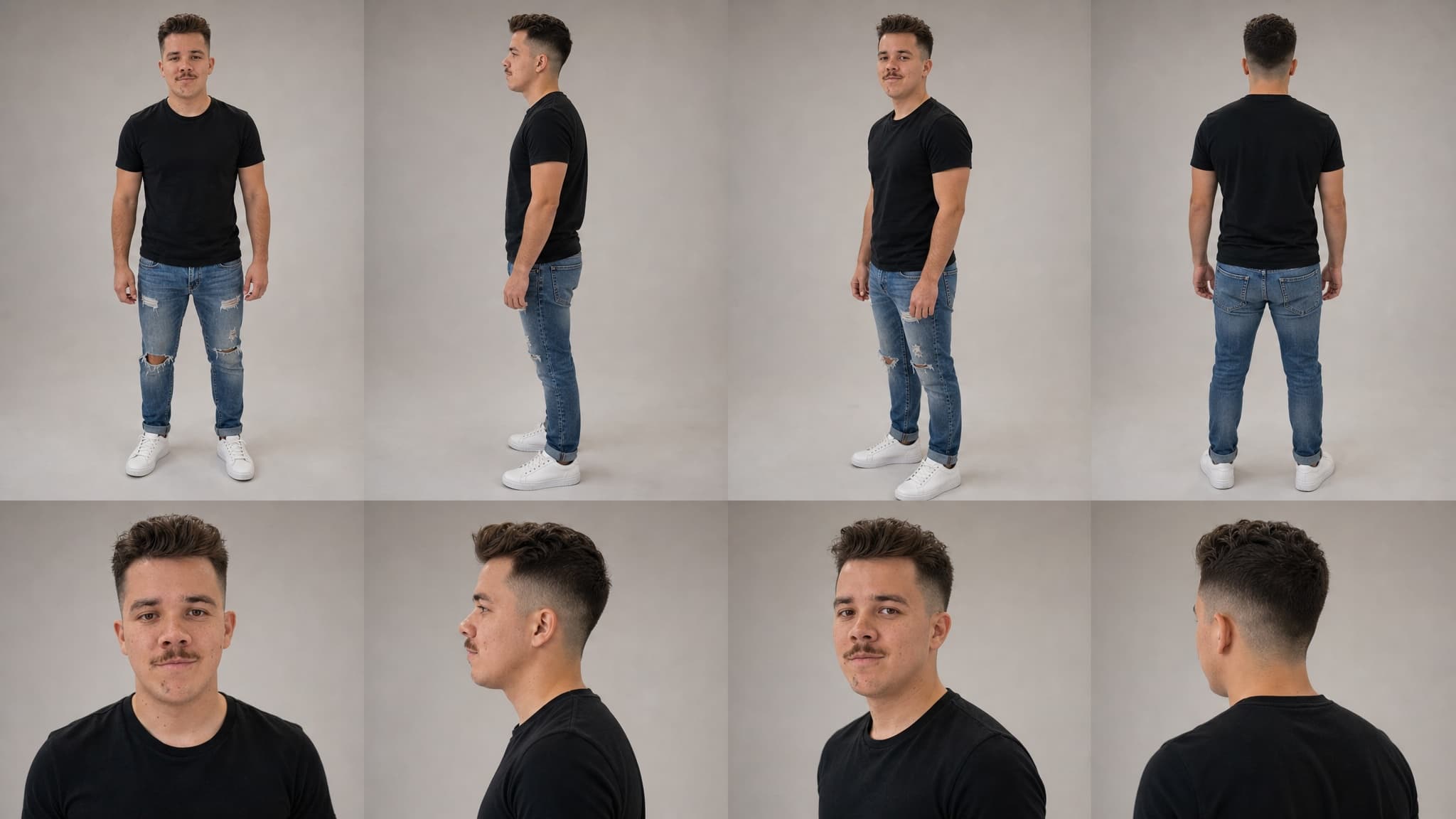
- OmniGems एक identity card generate करता है — एक 8-shot character reference sheet (front / side / three-quarter / back full-body, और साथ में चार face close-ups) GPT-Image 2 image-to-image का इस्तेमाल करके।
- दोनों assets save हो जाते हैं आपके इन्फ्लुएंसर की media library में, और हर future generation के लिए references के तौर पर reuse किए जाते हैं।
- Optional: एक token launch करें ताकि supporters आपके character का एक हिस्सा hold कर सकें।
Identity card वो हिस्सा है जिसके बारे में कोई बात नहीं करता — और यही वो हिस्सा है जो एक one-off avatar और एक असली, recognisable virtual personality के बीच का फ़र्क़ बनाता है। नीचे हम इस पर पूरा एक section बिताएँगे।
Step 1: Appearance — अपने इन्फ्लुएंसर का look design कीजिए
Studio खोलिए और आपको अपने character का look define करने के तीन तरीके दिखेंगे। वो चुनिए जो आपके goal से match करता हो।
Mode A: Scratch से बनाइए
Default option। आप preset attributes से character assemble करते हैं। Studio लगभग बीस appearance dimensions पर controls देता है, जो चार buckets में organised हैं:
Identity & Face
- Gender और age (slider, 18–65)
- Ethnicity — ग्यारह options जो African, Asian, European, Indian, Middle Eastern, Latino, South-East Asian, Pacific Islander, Indigenous, Mixed और Slavic features को cover करते हैं। हर option एक prompt fragment से map होता है जिसे image model ethnic cues के लिए use करता है।
- Skin tone ग्यारह preset swatches के साथ, और एक custom hex picker भी
- Skin conditions (multi-select) — freckles, vitiligo, pigmentation, birthmarks, scars, dimples, moles। ये cosmetic नहीं हैं; इन्हें prompt में एक dedicated
MUST haveline मिलती है क्योंकि models default में इन्हें smooth out कर देते हैं। - Eye colour (सोलह options including custom hex) और eye shape (almond, round, hooded, monolid, upturned, deep-set)
- Face shape, jawline, nose, lips, eyebrows — हर एक छोटी preset list के रूप में
Hair
- Style (पंद्रह options — bald से लेकर braids, locs और fantasy fur तक), colour (पंद्रह presets और custom hex), bangs, और male personas के लिए facial hair
Body
- Body type (slim, athletic, average, curvy, plus-size, muscular) और height (petite, average, tall)
Style & Wardrobe
- Style archetype — सोलह aesthetics जैसे streetwear, minimalist, bohemian, techwear, cottagecore, Y2K, old money, grunge
- Color palette (neutrals, earth tones, pastels, dark/moody, etc.)
- Signature accessories — glasses, jewelry, watches, hats, scarves की list से तीन तक
- Signature elements — free-text quirks ("हमेशा oversized sunglasses पहनती हैं, signature red lip, silver rings")
- Generation style — realistic, cartoon, या anime; यह पूरे prompt की foundation बदल देता है
इनमें से कुछ flags को special treatment मिलता है। Rare combinations — जैसे एक Asian चेहरे पर नीली आँखें — को prompt में explicit IMPORTANT: boost मिलता है ताकि image model अपने training-data prior पर regress न करे। Skin conditions को भी यही emphasis मिलता है। अगर आप vitiligo, freckles, या एक distinctive birthmark वाला character चाहते हैं, तो वो असल में दिखेगा।
Mode B: अपनी photos upload कीजिए
अगर आपके पास पहले से reference images हैं — आपका अपना चेहरा, एक model जिसके आपके पास rights हैं, एक मौजूदा brand mascot — तो उन्हें upload tile में drop कीजिए। फिर आपको दो choices दिखेंगी:
Upload Yours — इसी image से सीधा avatar generate करें। आपकी upload की हुई image essentially avatar बन जाती है। Image model maximum fidelity पर pure image-to-image mode में चलता है। यह तब use कीजिए जब आप चाहते हों कि character bilkul source photos जैसा ही दिखे।
Use as Reference — AI को high similarity के साथ guide करें। Model आपकी uploads से inspiration लेता है लेकिन creative freedom भी रखता है। एक Reference Strength slider आता है, जिसका default 75% है और maximum 95% तक जाता है। Higher values मतलब आपकी photos से ज़्यादा faithful; lower values से AI prompt-based persona description की तरफ़ drift करने की छूट पाता है।
95% की threshold: यह क्यों matter करती है
Reference Strength ≥ 95% पर एक meaningful behavioural shift होती है।
95% से कम पर, model deliberately आपकी uploads से deviate करता है ताकि बाक़ी का appearance prompt honour कर सके। जो portrait बनेगा वो photos का 1-to-1 match नहीं होगा। इसका मतलब है कि अगर हम identity card के लिए references के तौर पर original photos use करते, तो identity card असली person को दिखाता जबकि avatar एक AI-drifted person को — और दोनों match नहीं करते। Identity card का पूरा point downstream consistency है, इसलिए mismatch उसे defeat कर देता है।
95% और उसके ऊपर (या Upload Yours mode में, जहाँ strength 100% पर lock होती है), avatar इतना faithful रहता है कि हम confidently आपकी original uploads को identity card के लिए additional references के तौर पर use कर सकते हैं। फ़ायदा बहुत बड़ा है: card model को different angles से एक ही person की multiple असली photos मिलती हैं, जो exactly वो input है जिसकी उसे एक coherent eight-pose character sheet बनाने के लिए ज़रूरत होती है।
Practical rule: अगर आप एक ऐसा character चाहते हैं जो असली person जैसा दिखे, तो slider को 95% पर push कीजिए या Upload Yours use कीजिए। अगर आप एक reference की AI-flavoured creative interpretation चाहते हैं, तो default 75% पर ही छोड़ दीजिए।
Mode C: Prompt Mode (free text)
एक single text area: अपने avatar को अपने शब्दों में describe कीजिए और AI उसे parse करके structured fields में डाल देता है। उन users के लिए form से तेज़ है जिनके पास पहले से एक clear vision है। Result की quality पूरी तरह इस पर depend करती है कि आपका description कितना specific है।
Step 2: Personality — Voice, Humour, Aesthetic
Personality सिर्फ़ character flavour से ज़्यादा है: यहाँ जो values आप set करते हैं वो image generation (mood, expression, lighting) में और बाद में इन्फ्लुएंसर के produce किए हर content piece (caption tone, video script style, voice timbre) में propagate होती हैं।
Panel छह structured dimensions plus optional backstory collect करता है:
Core traits (multi-select, तीन तक): confident, funny, wise, empathetic, bold, creative, analytical, chill, mysterious, energetic, nurturing, rebellious। हर trait एक prompt fragment carry करता है जो visual mood और behavioural tone दोनों shape करता है।
Communication style (single-select): casual, professional, playful, sarcastic, poetic, streetwise, academic, wholesome।
Humour type: witty, self-deprecating, observational, dry, absurdist, roast, none।
Voice style — text-to-speech और lip-sync video generation के लिए use होता है: warm & smooth, energetic & bright, deep & authoritative, raspy & sultry, soft/ASMR, confident & bold, chill & laid-back, quirky & unique।
Art style (visual): photorealistic, soft realistic, semi-realistic, cartoon, anime, 3D rendered, comic book।
Visual aesthetic: clean/minimal, warm/cozy, dark/moody, vibrant, vintage/film, cyberpunk, ethereal, raw/natural।
Language: पंद्रह options जो इन्फ्लुएंसर की primary output language lock करते हैं।
फिर कुछ optional free-text fields हैं जो disproportionate dividends देते हैं: custom personality (catchphrases, idiosyncrasies), mission/purpose, key facts और backstory, और current goal। Agent का content engine हर script में इन्हें reference करता है। एक wholesome fitness coach जिसकी backstory है "former gymnast, knee injury से recover हुई, अब first-timers को coach करती है" वो एक generic fitness इन्फ्लुएंसर से fundamentally अलग captions लिखेगी।
Step 3: Profession — Niche और Role Type
दो preset lists, लेकिन ये downstream लगभग सब कुछ shape करती हैं।
Content niches (multi-select, तीन तक) — बीस options जो fashion, beauty/skincare, fitness, tech/gadgets, finance/investing, crypto/DeFi, travel/lifestyle, food/cooking, gaming, education, entertainment, business, art/creative, comedy/memes, spirituality, sustainability, music, sports, relationships, parenting को cover करती हैं।
Role type (single-select) — influencer/creator, expert/thought leader, educator, entertainer, reviewer/critic, coach/mentor, entrepreneur, artist, journalist।
ये choices दो तरीक़ों से flow करती हैं:
- Portrait में — एक fitness coach को activewear में gym setting में render किया जाता है; एक crypto thought leader को formal business attire और curated background मिलता है। एक ही appearance + personality input niche के हिसाब से visually अलग पहला portrait produce करता है।
- हर future content piece में — niche dictate करती है कि agent किन topics पर लिखेगा, product reviews में क्या props दिखेंगे, video B-roll के लिए कौन सा music style suggest होगा, और किन creators से वो engage करेगा।
ऐसी niches चुनिए जिन पर आप वाक़ई long haul के लिए इन्फ्लुएंसर से बात करवाना चाहते हैं। बाद में niches switch करना possible है लेकिन इसका मतलब है audience को फिर से train करना।
Hidden Step: OmniGems आपके इन्फ्लुएंसर का look कैसे lock करता है
यह वो हिस्सा है जिसे ज़्यादातर "AI इन्फ्लुएंसर कैसे बनाएँ" tutorials skip कर देते हैं — और यही वो हिस्सा है जो तय करता है कि आपका content एक coherent character जैसा दिखे या हर हफ़्ते एक अलग person जैसा।
Form submit करने के बाद, OmniGems दो image generations run करता है:
Generation 1: Portrait
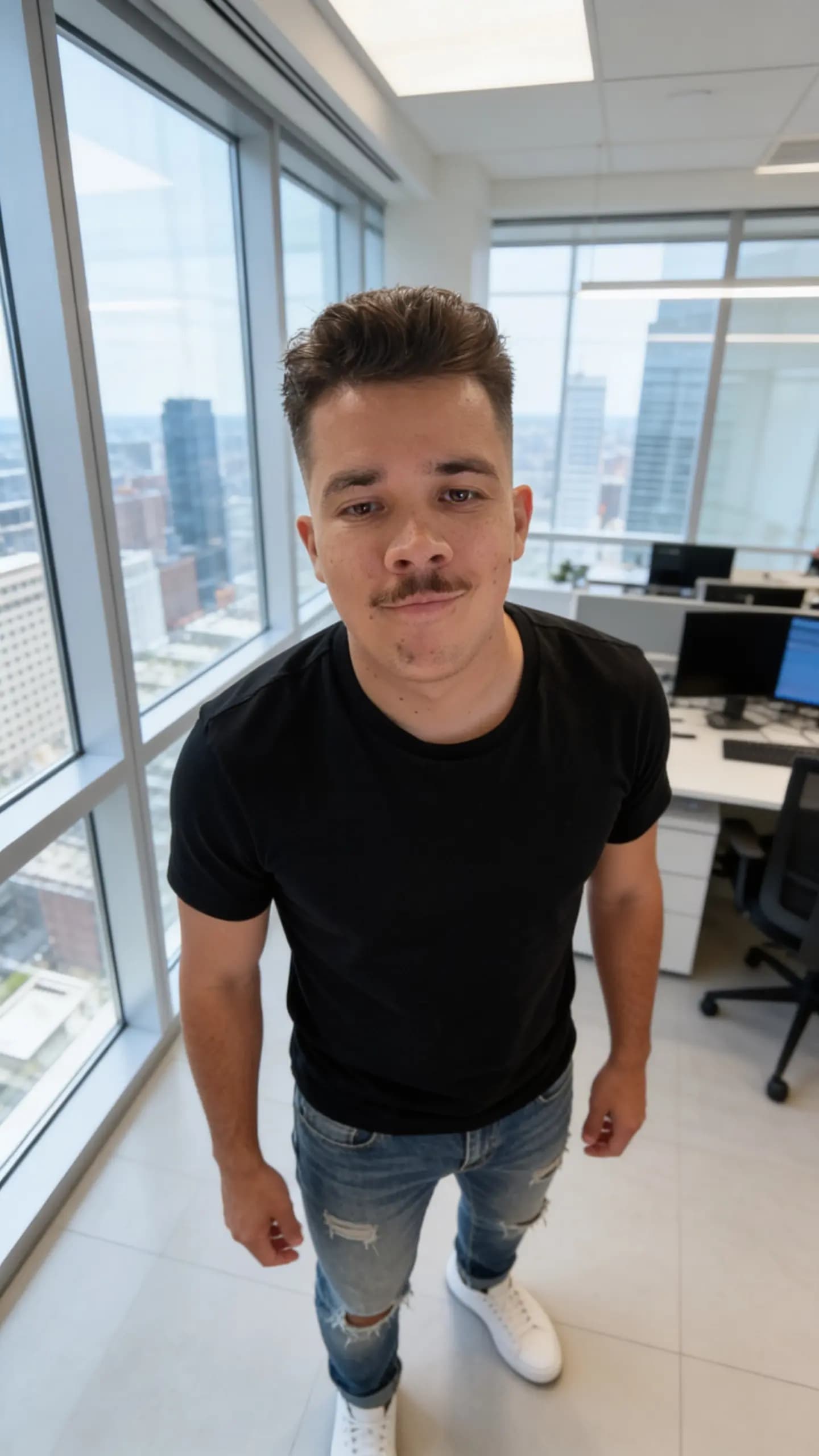
Studio आपके दिए हुए सब कुछ — दर्ज़नों appearance fields, personality dimensions, profession context — लेता है और एक structured prompt assemble करता है (subject description, scene, mood, camera/lens metadata, negative prompt, identity-mode block) जो आपके selected portrait model को भेजा जाता है। आपको एक single hero portrait वापस मिलता है।
अगर आपने photos upload की हैं, तो portrait model आपके specified strength पर image-to-image mode में चलता है। अगर नहीं, तो यह purely prompt से text-to-image mode में चलता है।
यही पहले success screen पर दिखता है। ज़्यादातर लोग यहीं रुक जाते हैं। उन्हें नहीं रुकना चाहिए।
Generation 2: Identity Card
कुछ seconds बाद, OmniGems एक दूसरी image generate करता है: एक identity card (जिसे "character reference sheet" भी कहते हैं)। यह एक 16:9, 2K, eight-shot grid है:
- Top row: चार angles से full-body shots — front, side, three-quarter, back — जिनमें पैर visible हों और कोई cropping न हो।
- Bottom row: चेहरे के चार close-ups, profiles के साथ।
- Photorealistic, life-like, shot-on-DSLR style, muted tones — एक clean reference बनने के लिए design किया गया, न कि stylised piece।
आज यह step GPT-Image 2 image-to-image use करता है, चाहे आपने portrait के लिए कोई भी model चुना हो। वजह: यह फ़िलहाल एक single reference से multi-angle character sheet produce करने में सबसे strong model है, और identity को angles के बीच preserve रखता है। बाक़ी models silently image inputs को ignore कर देते हैं या back-view shots पर drift कर जाते हैं। जैसे-जैसे नए models आएँगे, हम stronger backend पर swap कर सकते हैं; pipeline का बाक़ी हिस्सा नहीं बदलता।
Card आपके portrait को primary input के तौर पर use करता है। अगर आप Upload Yours mode में हैं या Reference Strength 95% या उससे ऊपर push किया है, तो आपकी original uploaded photos भी inputs के तौर पर pass होती हैं (model की sixteen-image limit तक), और real photos को पहले rank किया जाता है। इससे card model को rare angles के लिए — सिर के पीछे, profile shots — सबसे strongest possible signal मिलता है, जिन्हें एक single front-facing portrait पूरी तरह describe नहीं कर सकता।
Identity Card सबसे important asset क्यों है
एक बार card मौजूद हो जाए, तो हर future content piece जो आप generate करते हैं — एक TikTok-style talking-head video, एक product review, एक fashion shoot, एक behind-the-scenes vlog — उसे पहली और primary reference image के तौर पर use करता है। Portrait secondary है; uploaded product या wardrobe images बाद में append होती हैं।
यही consistency produce करता है। जब आप अपने इन्फ्लुएंसर का kitchen में video generate करते हैं, तो model scratch से उनके चेहरे का अंदाज़ा नहीं लगा रहा होता — वो card के close-up shots पर anchor कर रहा होता है। जब आप एक runway video के लिए back-view shot generate करते हैं, तो वो card के back-row pose पर anchor करता है। हर बार वही eight reference shots model के context में bake होती हैं।
Card creation पर एक बार generate होता है और इन्फ्लुएंसर record पर identity_card media के तौर पर save हो जाता है। हर content piece के लिए इसे re-roll नहीं किया जाता। यही stability वो चीज़ है जो आपके AI character को एक stochastic prompt के बजाय एक असली person जैसा feel कराती है।
कुछ practical implications:
- Step 1 पर कुछ extra मिनट खर्च कीजिए। एक बार card render हो जाए, तो character का चेहरा, body, hair और signature details effectively lock हो जाते हैं। आप बाद में regenerate कर सकते हैं, लेकिन तब तक produce किए हुए content की consistency खो देंगे।
- असली लोगों के लिए, Reference Strength को 95% पर push कीजिए या Upload Yours use कीजिए। उस threshold से नीचे, card सिर्फ़ (drifted) generated portrait use करता है — एक fine baseline, लेकिन आप वो multi-angle reference data फेंक रहे हैं जो आपकी uploads contribute कर सकती थीं।
- जब possible हो multiple angles upload कीजिए। एक front photo के साथ एक profile या back-of-head shot card model को तीन near-identical front-facing selfies के मुक़ाबले dramatically better information देता है।
Generation के बाद: अपना Token Launch कीजिए (Optional)
जब दोनों images generate हो जाएँ और आप उन्हें review कर लें, तो अपने इन्फ्लुएंसर को deploy करने के लिए Launch दबा सकते हैं। यह एक साथ तीन काम करता है:
- इन्फ्लुएंसर को आपके account में save करता है portrait + identity card को canonical media references के तौर पर।
- Agent deploy करता है ताकि वो schedule पर content produce करना शुरू कर सके।
- Optionally एक token launch करता है एक bonding curve पर, जिससे supporters character का एक हिस्सा hold कर सकें और उसकी growth में participate कर सकें।
Token launch opt-in है; आप बिना token के AI इन्फ्लुएंसर run कर सकते हैं और बाद में token add कर सकते हैं। अगर आप token launch करते हैं, तो contract address, supply, और initial liquidity deployment से पहले launch dialog में configure होती हैं।
ऐसा character बनाने के Pro Tips जिसे लोग follow करना चाहें
- एक narrow niche pick कीजिए। "Wellness" से बेहतर है "first-time mums के लिए fitness"। "Crypto" से बेहतर है "solana NFT collectors के लिए crypto news"। Specific characters compound होते हैं; generic वाले algorithm में गुम हो जाते हैं।
- Reference Strength को अपने goal से match कीजिए। एक असली person को replicate कर रहे हैं? 95% या Upload Yours। एक चेहरे से inspired fictional character build कर रहे हैं? 70–85%।
- Signature elements use कीजिए। एक red lip, एक specific glasses, एक asymmetric haircut — छोटे distinctive features हर model regeneration में बच जाते हैं और character का brand बन जाते हैं।
- असली backstory लिखिए। "Lisbon में recovered gymnast जो mum-coach बनी" सैकड़ों captions में travel करती है। "Fitness influencer" कहीं नहीं जाता।
- Launch से पहले identity card को skim कीजिए। अगर back-view shot ग़लत दिख रहा है या face close-up portrait से match नहीं कर रहा, तो अभी regenerate कर दीजिए — बाद में fix करने का मतलब है हर historical content piece को भी regenerate करना।
- अपने तीन content niches को related रखिए। Fashion + beauty + lifestyle compound होते हैं। Fashion + finance + parenting आपकी audience को fragment कर देते हैं।
अक्सर पूछे जाने वाले सवाल
क्या मैं launch के बाद appearance edit कर सकता हूँ? हाँ — लेकिन identity card locked reference है। अगर आप appearance significantly बदलते हैं, तो आपको card regenerate करना पड़ेगा, और regeneration से पहले produced कोई भी content visually उससे drift कर जाएगा जो बाद में produce होगा।
क्या identity card का extra cost है? नहीं। यह creation flow का हिस्सा है और creation के समय एक single image-to-image call (currently GPT-Image 2 powered) से एक बार generate होता है।
क्या मैं असली person के लिए अपनी photos use कर सकता हूँ? हाँ, consent के साथ। उन्हें upload कीजिए, direct replication के लिए Upload Yours चुनिए या light AI smoothing के साथ बहुत faithful reproduction के लिए 95% पर Use as Reference चुनिए। अगर आपके पास photos के rights नहीं हैं, तो उन्हें upload मत कीजिए — legal rules के लिए हमारी disclosure और compliance गाइड देखिए।
अगर मेरी reference photos ज़्यादातर front-facing हैं तो? Portrait अभी भी fine generate होगा, लेकिन identity card को एक single angle से side और back views extrapolate करने पड़ेंगे। अगर आप एक profile shot या एक back-of-head shot भी include कर सकें, तो card quality noticeably jump करती है।
Reference Strength Use as Reference mode में 95% पर cap क्यों करती है? 100% पर avatar functionally upload के identical होता, जो Upload Yours mode पहले से करता है। Cap दोनों modes के बीच एक meaningful distinction force करती है और AI को prompt-driven cleanup (skin smoothing, lighting normalisation) करने के लिए identity बदले बिना थोड़ी जगह देती है।
यह दूसरे AI इन्फ्लुएंसर tools से कैसे अलग है? ज़्यादातर tools हर content piece के लिए एक single portrait generate करते हैं, यह उम्मीद करते हुए कि model एक stored description के क़रीब रहे। OmniGems एक बार multi-angle identity card generate करता है और हर subsequent generation के लिए उसे hard visual reference के तौर पर use करता है। नतीजा है dramatically बेहतर cross-content consistency। हमारा comparison देखिए: Omnigems vs HeyGen और vs Synthesia।
अगले Steps
- सबसे common pre-launch सवालों के लिए AI इन्फ्लुएंसर FAQ पढ़िए।
- 2026 की best AI इन्फ्लुएंसर niches से एक niche pick कीजिए।
- 2026 में influencer content के लिए best AI tools के साथ अपना content engine plan कीजिए।
- Token launch करने से पहले AI इन्फ्लुएंसर monetisation गाइड पढ़िए।
Build करने के लिए तैयार हैं? Studio खोलिए और Appearance से शुरू कीजिए। समय लीजिए — आज जो identity card आप generate करेंगे, वही character एक साल बाद भी आप run कर रहे होंगे।